Customizing Your TAW Swag

TAW SHOP Division

Customizing SHOP product
Guide for customizing your ideal product

This guide is made for The Art of Warfare community and for purpose of explaining TAW members how to customize TAW SHOP products.
STEP ONE
SELECTING YOUR PRODUCT
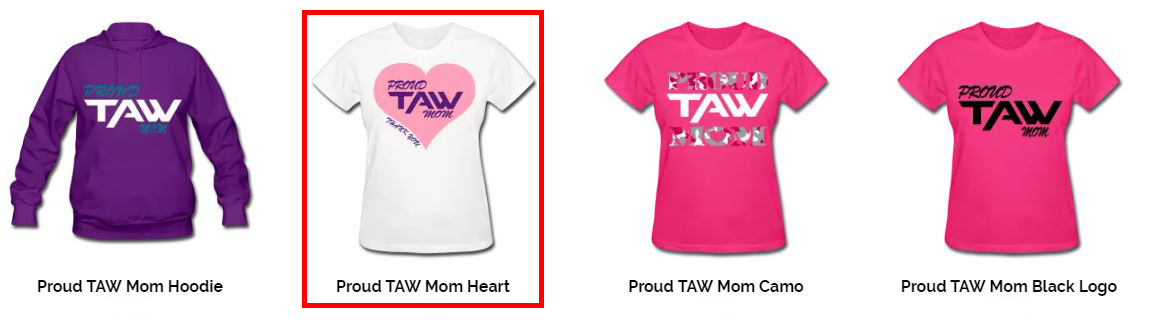
The first step when opening TAW SHOP (NA or EU), is to find product that you like. We recommend that in this point you do not focus on colors of product or design as they can be changed.
Clicking on product will open choosen product site where you will be able to get more informations about product itself.

Specific product site will allow you to change product color but not and design colors. For design color please check step 2 below.

STEP TWO
CHOOSING COLOR OF DESIGN
To access options for changing design colors, click on “Do you want to edit the design?” bellow product image.

After clicking edit option, you will get access to following view, where you will be able to select specific layer and change the color. In this view you can also again change product color or scale design.

LAST STEP
ADDING TEXT AND CART
TAW SHOP also have new feature of adding text on products in design view.
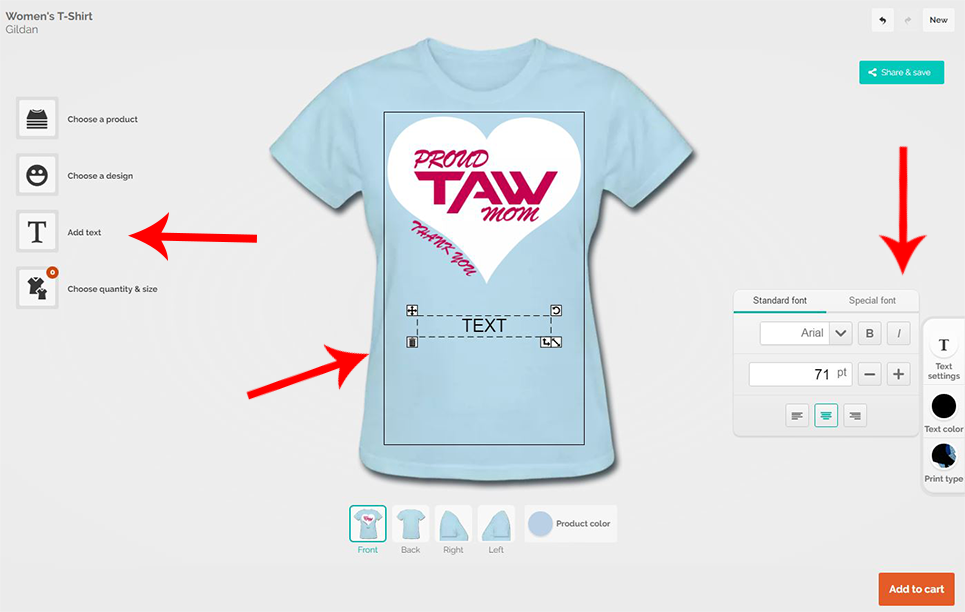
After clicking on “Add text” on product you will see added text box that you are free to edit. On right side you have the options for choosing font, font size and color, even “print type”.
Note that text that is added need to be in accordant with The Art of Warfare Code of Ethics.
Note that adding text will increase product cost.
When you made your choice last thing you need to do is add the product to cart (bottom-right corner). In that moment menu for choosing product size will be shown. On end all you need to do is confirm choice.
* Any questions, please contact Shop DC
**Credit to Abnormalskillz for creating this guide
Baron
SHOP DC
"How may I help you?"
Replies
1 commentsis there a way to put our custom TAW seals on like the sleeve?